Troubleshooting Pulsar Functions using UI
To help you get comfortable troubleshooting Pulsar Functions, we will discuss four different errors you may encounter:
- Secret referenced in pulsarctl functions create doesn’t exist. (no error thrown)
- Problem with class path. (Restarts)
- Problem with requirements file. (Restarts)
- Error when executing code. (User Exception)
Note that it may be helpful to change the name of the function each time you deploy it when troubleshooting. Logs are segregated by Pulsar Function name and this will help avoid viewing older log messages after redeploying with slight code changes.
The video to the right demonstrates Examples 2, 3 and 4.
Error 1: Secret referenced in pulsarctl functions create doesn’t exist.
In the scenario where the secret referenced in pulsarctl functions create doesn’t exist, the pulsarctl command will return with a Create successfully message in terminal, but no Pulsar Function will be visible in the UI. There will be no obvious problem. Double check that the secret referenced in pulsarctl functions create is correct. If it appears correct, reach out to StreamNative Training at training-help@streamnative.io for help.
Error 2: Problem with class path. (Restarts observed)
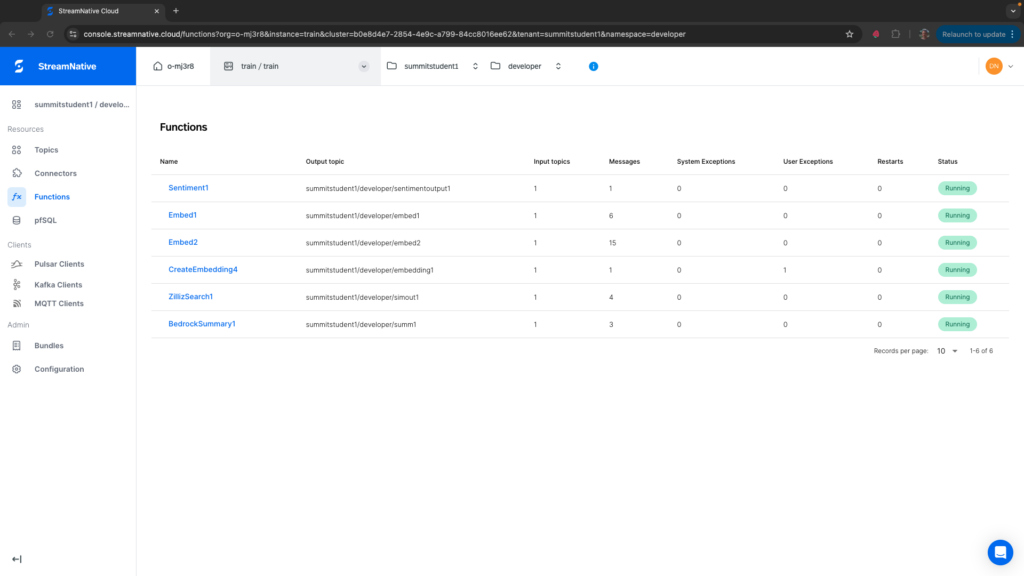
In the scenario where there is a problem loading the Pulsar Function such as an incorrect class path in pulsarctl functions create, the Pulsar Function will restart repeatedly. In the below image, the class path referenced in pulsarctl functions create for CreateEmbedding1 doesn’t exist (deployed using –classname streamnativerag1.CreateCohereEmbeddin instead of –classname streamnativerag1.CreateCohereEmbedding).
You will not observe a System Exception, but viewing the Logs you would find the following messages. “Could not import User Function Module” errors can come from multiple sources, but in this case we also see “module ‘streamnativerag1’ has no attribute ‘CreateCohereEmbeddin'”. You should delete the Pulsar Function and recreate it with the correct classname.
[2024-11-08 18:35:25 +0000] [INFO] util.py: Failed to import class streamnativerag1.CreateCohereEmbeddin from path /tmp
           ^^^^^^^^^^^^^^^^^^^^^^^^^^^^^^^^^^^^^^^^^^^^^^^^
[2024-11-08 18:35:25 +0000] [INFO] util.py: module 'streamnativerag1' has no attribute 'CreateCohereEmbeddin'
             ^^^^^^^^^^^^^^^^^^^^^^^^
Traceback (most recent call last):
  File "/pulsar/instances/python-instance/util.py", line 73, in import_class_from_path
    return import_class_from_path(from_path, full_class_name)
[2024-11-08 18:35:25 +0000] [CRITICAL] python_instance.py: Could not import User Function Module streamnativerag1.CreateCohereEmbeddin
           ^^^^^^^^^^^^^^^^^^^^^^^^^^^^^^^^^^^^^^^^^^^^^^^^^^

  File "/pulsar/instances/python-instance/util.py", line 48, in import_class
During handling of the above exception, another exception occurred:
  File "/pulsar/instances/python-instance/util.py", line 43, in import_class
             ^^^^^^^^^^^^^^^^^^^^^^^^
    return import_class_from_path(api_dir, full_class_name)
  File "/pulsar/instances/python-instance/util.py", line 73, in import_class_from_path
Traceback (most recent call last):
[2024-11-08 18:35:25 +0000] [CRITICAL] python_instance.py: Could not import User Function Module streamnativerag1.CreateCohereEmbeddin
    retval = getattr(mod, class_name)
Error 3: Problem with requirements file. (Restarts observed)
In the scenario where there is a problem loading modules listed in the requirements file, the Pulsar Function will continue to restart. In the below image, boto3 module was added as botothree to the requirements file. You should delete the Pulsar Function and recreate after fixing the requirements.txt file.
Context "downloader" created.
Context "downloader" created.
Context "downloader" created.
[✖]  could not get well known endpoints from url https://auth.streamnative.cloud/.well-known/openid-configuration: Get "https://auth.streamnative.cloud/.well-known/openid-configuration": dial tcp: lookup auth.streamnative.cloud on 192.168.64.10:53: server misbehaving
Context "downloader" created.
[✖]  could not get well known endpoints from url https://auth.streamnative.cloud/.well-known/openid-configuration: Get "https://auth.streamnative.cloud/.well-known/openid-configuration": dial tcp: lookup auth.streamnative.cloud on 192.168.64.10:53: server misbehaving
Could not install user depedencies specified by the requirements.txt file
Error 4: Error when executing code. (User Exception observed)
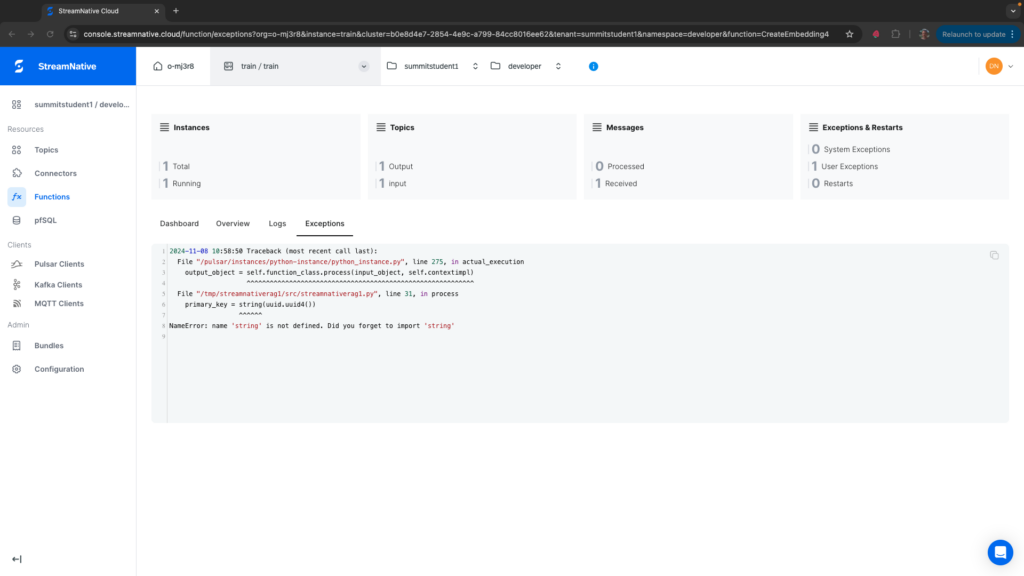
In the scenario where there is a problem executing the Python code, a User Exception will be thrown when the code executes. In the below image, a User Exception is thrown only after publishing a message to the input topic. The message indicates where the issue is in the Python code. We should have used str() instead of string().