
Example D: Introduction to RAG with StreamNative Pulsar Functions, OpenAI, and Milvus/Zilliz
In this example we use multiple workflows to create and sync embeddings, complete a similarity search, and summarize the data:
Part 1: Create and Sync Embeddings (OpenAI and Milvus/Zilliz Connector)
Part 2: Similarity Search (OpenAI + Milvus/Zilliz)
Part 3: Summarize Results (AWS Bedrock with Meta’s Llama 3.2)

We will deploy 4 Pulsar Functions and 1 StreamNative Kafka Connector in the following lessons to create the above streaming workflows, testing each functionality as we go. The following setup should be completed before starting.
- Complete Cluster Setup, Service Account, and pulsarctl.
- Download code example streamnativerag2.
OpenAI Setup
- Obtain an API Key for OpenAI.
- Create a StreamNative secret called myopenaikey with a key called apikey for storing the OpenAI API Key.

Zilliz Setup
- Create a Zilliz database and collection called mycollection with the following fields.
- primary_key VARCHAR(60)
- vector FLOAT_VECTOR(1536)
- original_text VARCHAR(1000)
- Note that Dynamic Field must be disabled under Advanced Settings for the Milvus Connector to work.

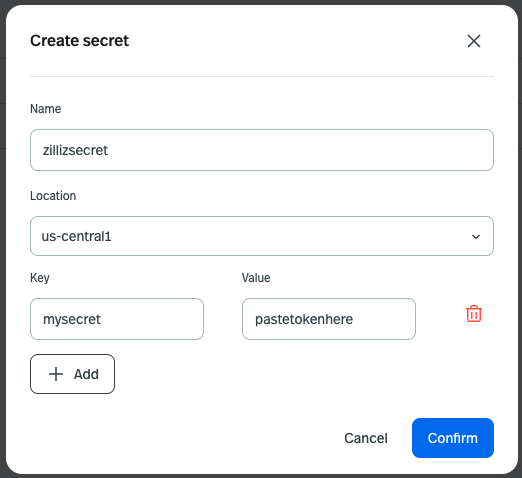
2. Copy the token for your Zilliz cluster and create a StreamNative secret called zillizsecret with a key called mysecret for storing the token. This secret will be used when completing a similarity search on the database. Hang onto a copy of the token. We will need it again when we deploy the Milvus Connector.
AWS Bedrock Setup
- Enable Meta Llama 3.2 1B Instruct in Amazon Bedrock, model id meta.llama3-2-1b-instruct-v1:0 (note code uses us.meta.llama3-2-1b-instruct-v1:0)
- Create a user in AWS IAM with the AmazonBedrockFullAccess policy.
- Create an access key for the IAM user and create a StreamNative secret storing the access key and secret access key.