
Example A: Convert Unstructured Text to JSON with Sentiment Analysis: AWS Bedrock with Anthropic’s Claude
This example is adapted from AWS Building with Amazon Bedrock: Text patterns labs “Lab I-6 Extracting JSON data from text“.
In this example we convert unstructured text data of an email into a structured json containing the following fields which can be used for routing:
- summary
- escalate_complaint
- level_of_concern
- overall_sentiment
- supporting_business_unit
- customer_names
- sentiment_towards_employees
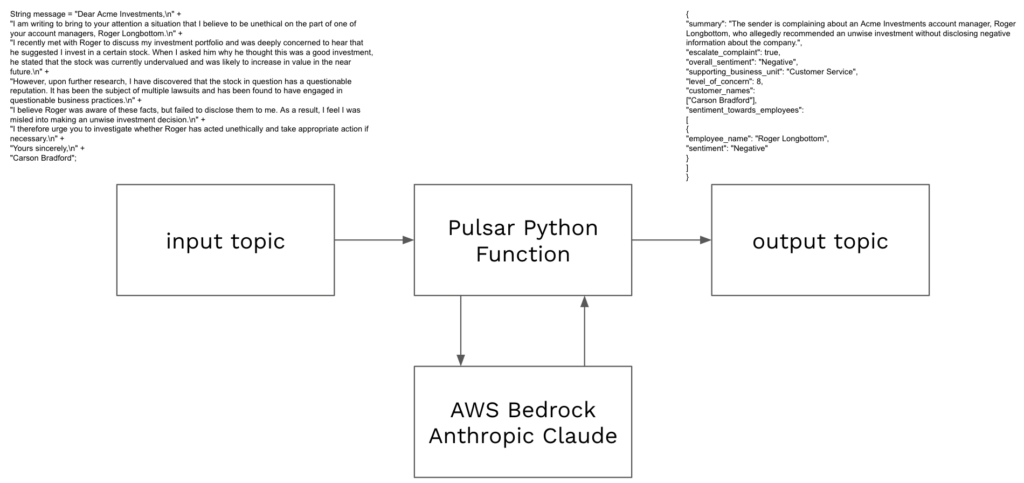
The video to the right is a high level overview of deploying and testing this Pulsar Python function.
Setup
- Complete Cluster Setup, Service Account, and pulsarctl.
- Download code example pythonexamples.
- Enable Claude 3 Sonnet in Amazon Bedrock, model id anthropic.claude-3-sonnet-20240229-v1:0.
- Create a user in AWS IAM with the AmazonBedrockFullAccess policy.
- Create an access key for the IAM user and create a StreamNative secret storing the access key and secret access key.
Deploying
Code for this example can be found in pythonexamples class SentimentAnalysis.
To deploy:
- Navigate terminal to the folder containing pythonexamples.zip.
- Execute the following pulsarctl command. Be sure to edit the tenant in three places in the command where you would like to deploy the Pulsar Function (–input, –output, –tenant).
pulsarctl functions create --classname pythonexamples.SentimentAnalysis --py ./pythonexamples.zip --inputs summitstudent1/developer/sentimentinput1 --output summitstudent1/developer/sentimentoutput1 --tenant summitstudent1 --namespace developer --name Sentiment1 --secrets '{"BEDROCKSECRET1": {"path": "bedrocksecret", "key": "accesskey"}, "BEDROCKSECRET2": {"path": "bedrocksecret", "key": "secretaccesskey"}}'If the Pulsar Function starts deploying, you should see:
Created Sentiment1 successfullyIt may take a minute or two for the function to deploy. Once fully deployed, you should see Sentiment1 has a Status of Running on the Functions page for your tenant and namespace. If you see any System Exceptions, view Troubleshooting Pulsar Functions.

A Bedrock client will be created using the secret you stored in StreamNative Cloud.
try:
    self.bedrock
except:
    ACCESS_KEY = context.get_secret("BEDROCKSECRET1")
    SECRET_KEY = context.get_secret("BEDROCKSECRET2")
    self.bedrock = boto3.client(
        service_name='bedrock-runtime',
        aws_access_key_id=ACCESS_KEY,
        aws_secret_access_key=SECRET_KEY,
        region_name="us-east-1")
The following message will be sent to the model where record is the message text that triggered the Pulsar Function. This is an input into the Pulsar Function.
message = {
    "role": "user",
    "content": [
        { "text": f"<content>{record}</content>" },
        { "text": "Please use the summarize_email tool to generate the email summary JSON based on the content within the <content> tags." }
    ],
}
Using AWS Bedrock, we make a call to Anthropic’s Claude, specifying the summarize_email tool and the tools_list. The response will be formatted and returned by the Pulsar Function to the output topic specified in the pulsarctl command used to deploy the function.
response = self.bedrock.converse(
    modelId="anthropic.claude-3-sonnet-20240229-v1:0",
    messages=[message],
    inferenceConfig={
        "maxTokens": 2000,
        "temperature": 0
    },
    toolConfig={
        "tools": tool_list,
        "toolChoice": {
            "tool": {
                "name": "summarize_email"
            }
        }
    }
)
We then format the response in the Python code. The formatted response is sent to the topic specified in –output of pulsarctl functions create using the return statement.
Testing
To test our Python Pulsar Function, we need to produce a string message to the topic specified in the –inputs field of the pulsarctl functions create command. In the example above this is summitstudent1/developer/sentimentinput1. This can be done easily using the Rest API with a walkthrough available here.
For this example, we suggest producing the following message to the input topic:
Dear Acme Investments,\n I am writing to bring to your attention a situation that I believe to be unethical on the part of one of your account managers, Roger Longbottom.\n I recently met with Roger to discuss my investment portfolio and was deeply concerned to hear that he suggested I invest in a certain stock. When I asked him why he thought this was a good investment, he stated that the stock was currently undervalued and was likely to increase in value in the near future.\n However, upon further research, I have discovered that the stock in question has a questionable reputation. It has been the subject of multiple lawsuits and has been found to have engaged in questionable business practices.\n I believe Roger was aware of these facts, but failed to disclose them to me. As a result, I feel I was misled into making an unwise investment decision.\n I therefore urge you to investigate whether Roger has acted unethically and take appropriate action if necessary.\n Yours sincerely,\n Carson BradfordThe complete curl command would look as follows (replace <SERVER ENDPOINT>, no port number is needed):
curl -X POST https://<SERVER ENDPOINT>/admin/rest/topics/v1/persistent/summitstudent1/developer/sentimentinput1/message \
  --header 'Authorization: Bearer <JWT TOKEN>' \
  --header 'Accept: application/json' \
  --header 'Content-Type: application/octet-stream' \
  --data-binary 'Dear Acme Investments,\n I am writing to bring to your attention a situation that I believe to be unethical on the part of one of your account managers, Roger Longbottom.\n I recently met with Roger to discuss my investment portfolio and was deeply concerned to hear that he suggested I invest in a certain stock. When I asked him why he thought this was a good investment, he stated that the stock was currently undervalued and was likely to increase in value in the near future.\n However, upon further research, I have discovered that the stock in question has a questionable reputation. It has been the subject of multiple lawsuits and has been found to have engaged in questionable business practices.\n I believe Roger was aware of these facts, but failed to disclose them to me. As a result, I feel I was misled into making an unwise investment decision.\n I therefore urge you to investigate whether Roger has acted unethically and take appropriate action if necessary.\n Yours sincerely,\n Carson Bradford'
If the Pulsar Function triggered, you should see 1 in the Messages column for Sentiment1.
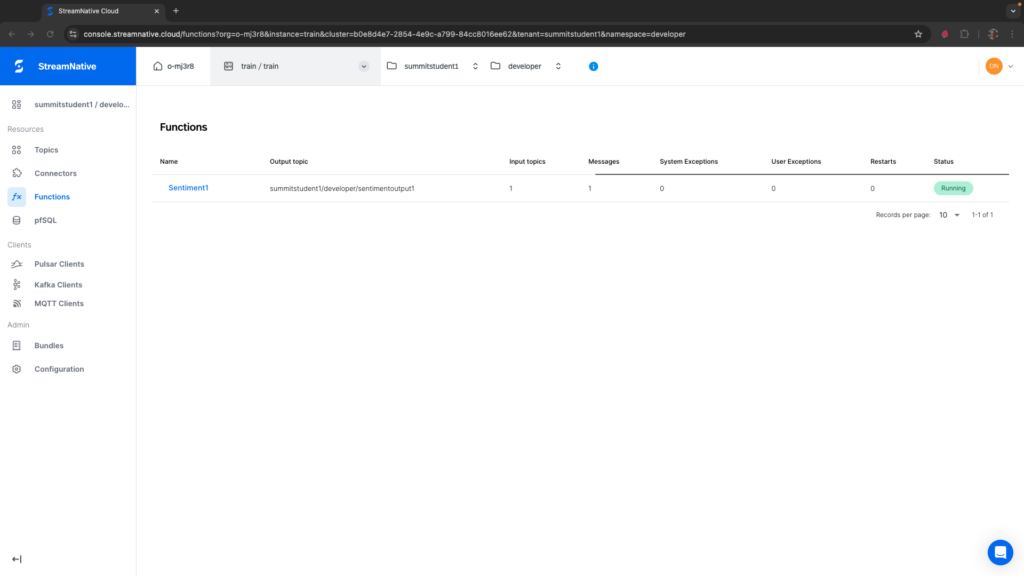
If you see any System Exceptions or User Exceptions, view Troubleshooting Pulsar Functions.
We will use the UI to check the results in the output topic. Navigate to the correct tenant and namespace specified in the –output field. Select the sentimentoutput1 topic.
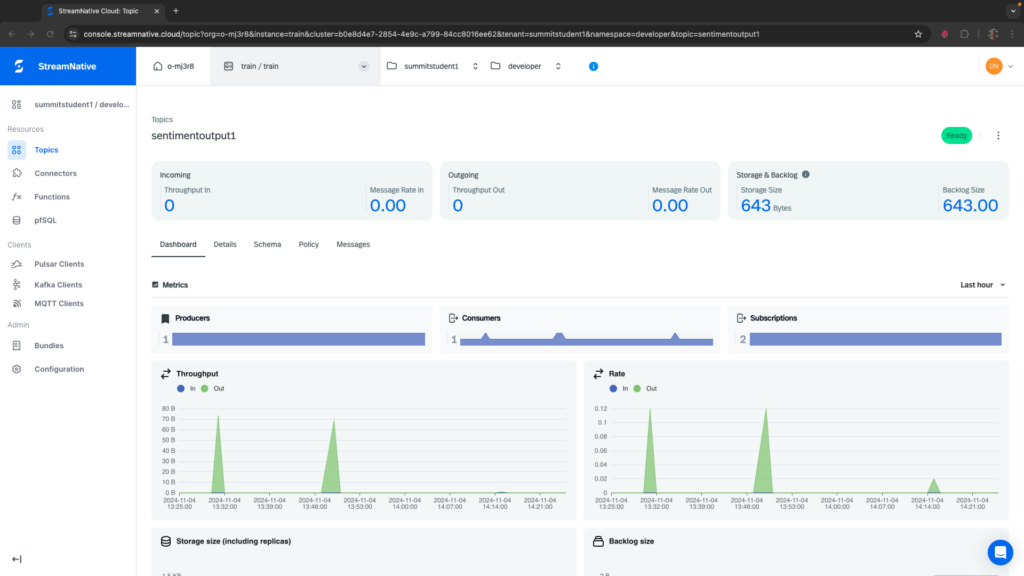
Before trying to peek at the messages, be sure you see some bytes in the Storage Size. While messages written to a topic without a subscription are by default eligible for deletion, they would not normally be deleted right away. If the storage size is still zero right after triggering the Pulsar Function, this could be a sign that the Pulsar Function did not produce results to the output topic correctly. View the section on Troubleshooting Pulsar Functions for more information.
To peek at the messages, navigate to the Details tab and create a subscription at the bottom of the page. Here I created a subscription called mysubscription and there are two messages in the backlog (you will most likely see one message).
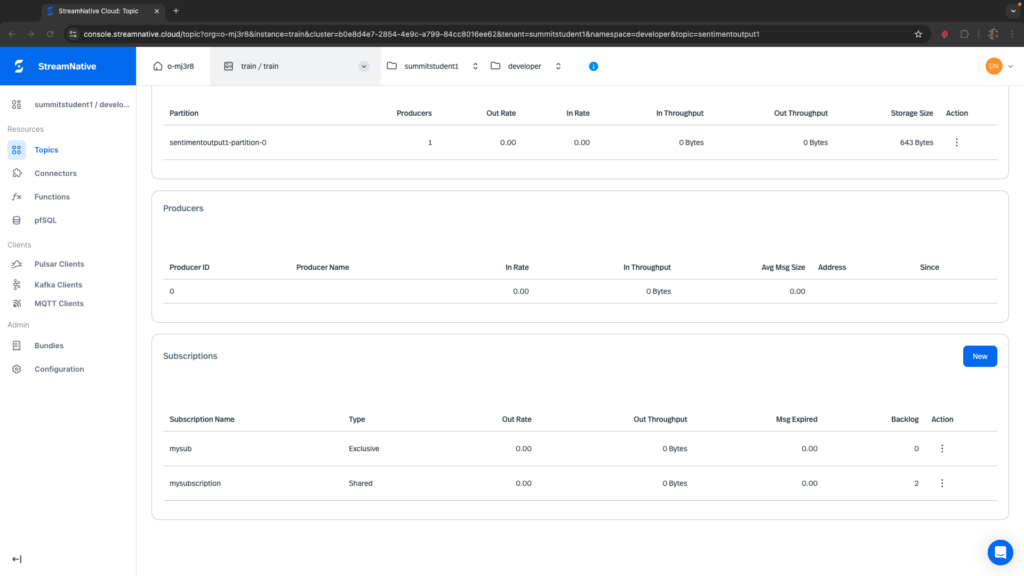
To view these messages, navigate to the Messages tab, select the partition sentimentoutput1-partition-0, the subscription mysubscription, and select a number of messages to peek.
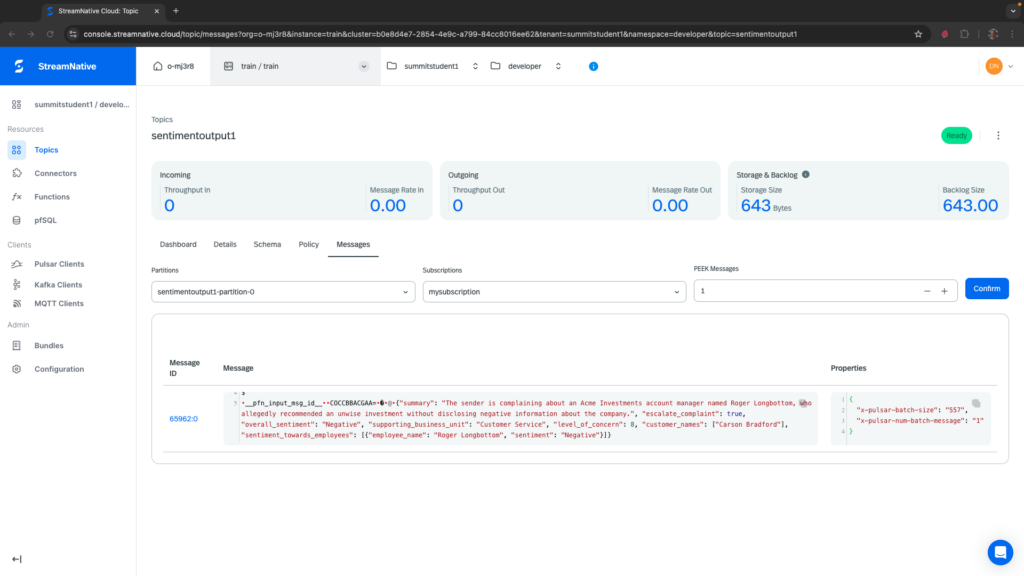
You should see the results of the Pulsar Function with the json fields specified in tools_list. Here it is formatted so it’s easier to read.
{
  "summary": "The sender is complaining about an Acme Investments account manager, Roger Longbottom, who allegedly recommended an unwise investment without disclosing negative information about the company.",
  "escalate_complaint": true,
  "overall_sentiment": "Negative",
  "supporting_business_unit": "Customer Service",
  "level_of_concern": 8,
  "customer_names":
   ["Carson Bradford"],
  "sentiment_towards_employees":
   [
    {
      "employee_name": "Roger Longbottom",
      "sentiment": "Negative"
    }
  ]
}
We’ve now converted unstructured text into a structured JSON that can be used to route the message for further processing. This was done using a Python Pulsar Function to make a simple API call to AWS Bedrock hosting Anthropic’s Claude.
Deleting Pulsar Function
To delete the Pulsar Function, execute the following from pulsarctl.
pulsarctl functions delete --tenant summitstudent1 --namespace developer --name Sentiment1