
KStreams
For our Kafka Hello World example, we published String messages. Let’s use those String messages in a KStreams word count application. We will make edits to SNWordCountApplication in the KStreams project.
Make the following changes in SNWordCountApplication:
- Edit keyPath to be the full path to your OAuth2 credentials file
- Edit StreamsConfig.APPLICATION_ID_CONFIG to use your student id
- Edit inputTopic to use your student id
- Edit Materialized.as to use your student id
Execute SNWordCountApplication. You should see the following:
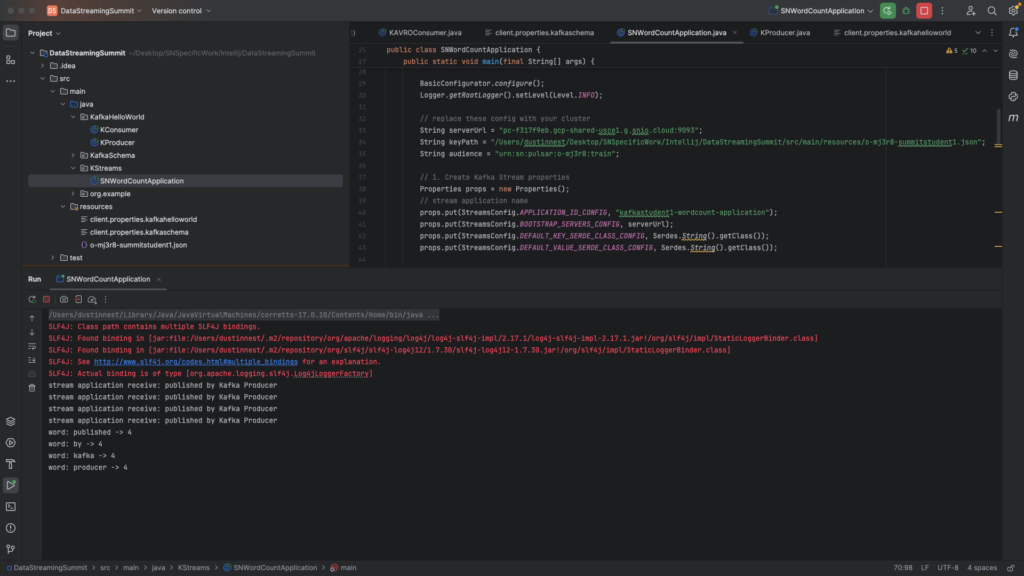
You can execute KProducer and SNWordCountApplication should receive the message and update with the new word count.
Note: We made sure to include your student id in StreamsConfig.APPLICATION_ID_CONFIG and Materialized.as since Kafka will create system topics in public/default tenant/namespace to support KStreams. Without the student id, your word count application may end up conflicting with other students.