
Example D: Create and Sync Embeddings, Similarity Search: OpenAI and Milvus/Zilliz Connector, Summarize with Llama 3.2
In this example we use multiple workflows to create and sync embeddings, complete a similarity search, and summarize the data:
- Create embeddings (OpenAI)
- Sync embeddings (Milvus Connector/Zilliz)
- Complete similarity search (OpenAI and Zilliz)
- Summarize data (AWS Bedrock Meta Llama 3.2)
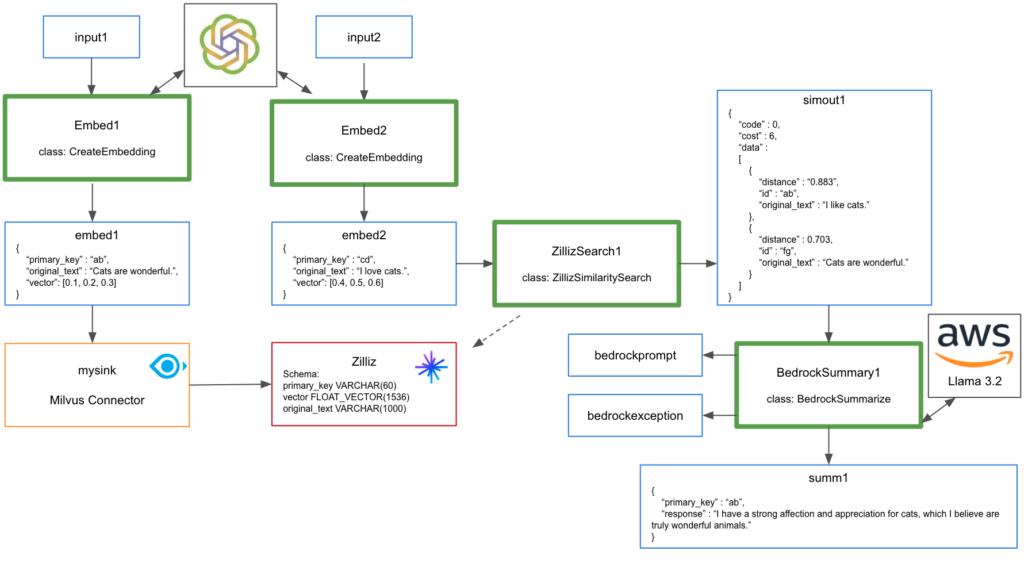
Use the scrape.zip for these examples.
1. Create embeddings (OpenAI)
After creating OpenAI client, use embeddings.create to create embedding.
try:
  self.client
except:
  mykey = context.get_secret("OPENAISECRET")
  self.client = OpenAI(api_key=mykey)

  response = self.client.embeddings.create(
    input=record,
    model="text-embedding-3-small"
  )
This can be deployed using pulsarctl functions create.
pulsarctl functions create --classname scrape.CreateEmbedding --py ./scrape.zip --inputs summitstudent1/developer/input1 --output summitstudent1/developer/embed1 --tenant summitstudent1 --namespace developer --name Embed1 --secrets '{"OPENAISECRET": {"path": "myopenaikey", "key": "apikey"}}'
Test function by writing string message to summitstudent1/developer/input1 using DocumentProducer in TestAIExampleD. Function output will be sent to summitstudent1/developerembed1.
2. Sync embeddings (Milvus Connector/Zilliz)
We use StreamNative UI to deploy the Milvus Connector to sync embeddings to Zilliz. The Milvus Connector is a Kafka Sink supported by StreamNative.
For this demonstration, the Zilliz collection was created with the following fields:
- primary_key VARCHAR(60)
- vector FLOAT_VECTOR(1536)
- original_text VARCHAR(1000)
- Note that Dynamic Field must be disabled under Advanced Settings for the Milvus Connector to work.
Navigate to Connectors, select Kafka Sinks and click on Create Kafka Sink. Note that Kafka Connectors will always deploy to public/default tenant/namespace regardless of what is selected in the UI.
Populate the following fields for the connector before deploying:
- Sink Name
- Service account (provide consume and functions permissions on public/default tenant/namespace, create service account binding)
- public.endpoint of Zilliz cluster
- Authentication Secret
- collection name
- topics (possible to use summitstudent1.developer.embed1, use “.” since this is a Kafka Connector)
- Value converter configuration “value.converter.schemas.enable” set to “false”
Test upsert by writing string message to summitstudent1/developer/input1. Embedding will be sent to summitstudent1/developer/embed1. Connector will then upsert data to Zilliz.
3. Complete similarity search (OpenAI)
Deploy CreateEmbedding again using pulsartcul functions create but using different input and output topics.
pulsarctl functions create --classname scrape.CreateEmbedding --py ./scrape.zip --inputs summitstudent1/developer/input2 --output summitstudent1/developer/embed2 --tenant summitstudent1 --namespace developer --name Embed2 --secrets '{"OPENAISECRET": {"path": "myopenaikey", "key": "apikey"}}'Test function by writing string message to summitstudent1/developer/topic2 using SearchProducer in TestAIExampleD. Function output will be sent to summitstudent1/developer/embed2.
Now that we have our embedding for the similarity search, let’s complete a similarity search with Zilliz.
user_embedding = ','.join(map(str,data["vector"])) #converts list to string for API call
payload = "{\"collectionName\":\"mycollection5\",\"data\":[[" + user_embedding + "]],\"limit\":2,\"outputFields\":[\"original_text\"]}"

headers = {
  "Authorization": "Bearer " + SECRET_KEY,
  "Accept": "application/json",
  "Content-Type": "application/json"
}

response = requests.post(url, data=payload, headers=headers)
Deploy using pulsarctl functions create.
pulsarctl functions create --classname scrape.ZillizSimilaritySearch --py ./scrape.zip --inputs summitstudent1/developer/embed2 --output summitstudent1/developer/simout1 --tenant summitstudent1 --namespace developer --name ZillizSearch1 --secrets '{"ZILLIZSECRET": {"path": "zillizsecret", "key": "mysecret"}}'
Test function by writing string message to topic summitstudent1/developer/input2 and the output will be sent to summitstudent1/developer/embed2. The similarity search will read from topic summitstudent1/developer/embed2 and return the most relevant results to topic summitstudent1/developer/simout1.
4. Summarize data (AWS Bedrock Meta Llama 3.2)
Now that we have relevant documents returned by the similarity search, this data can be summarized using AWS Bedrock Meta Llama 3.2. Create query requesting data returned by similarity search be summarized into a single sentence.
myinput = json.loads(record)

bedrockquery = "summarize the following data into a single sentence:"
for index, entry in enumerate(myinput["results"], start=1):
    bedrockquery = bedrockquery + " " + str(index) + ": " + entry['original_text']

conversation = [
    {
        "role": "user",
        "content": [{"text": bedrockquery}],
    }
]

try:
    response = self.bedrock.converse(
        modelId="us.meta.llama3-2-1b-instruct-v1:0",
        messages=conversation,
        inferenceConfig={"maxTokens":512,"temperature":0.5,"topP":0.9},
        additionalModelRequestFields={}
    )

    response_text = response["output"]["message"]["content"][0]["text"]
    return f'{{"primary_key": "{str(uuid.uuid4())}", "response": "{str(response_text)}"}}'
Deploy using pulsarctl functions create.
pulsarctl functions create --classname scrape.BedrockSummarize --py ./scrape.zip --inputs summitstudent1/developer/simout1 --output summitstudent1/developer/summ1 --tenant summitstudent1 --namespace developer --name BedrockSummary1 --secrets '{"BEDROCKSECRET": {"path": "bedrocksecret", "key": "mysecret"}}'Test function by writing string message to topic input2 and the output will be sent to embed2. The similarity search will read from topic embed2 and return the most relevant results to topic simout1. The summary function will read from simout1 and write the summary to topic summ1.
You can view the final summary by executing SearchProducer in TestAIExampleD.