Example C: Introduction to RAG with StreamNative Pulsar Functions and AWS Bedrock
In this example we use multiple workflows to create and sync embeddings, complete a similarity search, and summarize the data.
To the right we present a diagram of our workflows. We will implement this in three parts:
Part 1: Create and Sync Embeddings (AWS Bedrock with Cohere and Postgres with pgvector)
Part 2: Similarity Search (AWS Bedrock with Cohere and Postgres with pgvector)
Part 3: Summarize Results (AWS Bedrock with Meta’s Llama 3.2)

We will deploy 5 Pulsar Functions, testing each Pulsar Function as we go. The following setup should be completed before starting.
- Complete Cluster Setup, Service Account, and pulsarctl.
- Download code example streamnativerag1.
AWS Bedrock Setup
- Enable Cohere Embed English v3 in Amazon Bedrock, model id cohere.embed-english-v3.
- Enable Meta Llama 3.2 1B Instruct in Amazon Bedrock, model id meta.llama3-2-1b-instruct-v1:0 (note code uses us.meta.llama3-2-1b-instruct-v1:0)
- Create a user in AWS IAM with the AmazonBedrockFullAccess policy.
- Create an access key for the IAM user and create a StreamNative secret storing the access key and secret access key.
AWS RDS Postgres Setup
- Create an AWS RDS Postgres database with a public endpoint (note that serverless AWS RDS Postgres databases cannot have public endpoints).
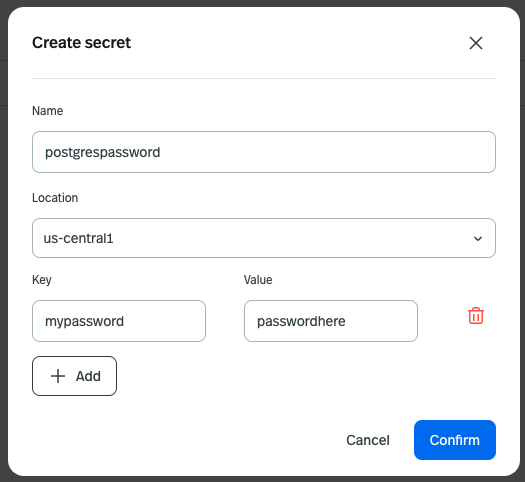
- Create a password for the default postgres user and create a StreamNative secret storing the password. Here is an example of the secret name and key to use for the password.