
Example C: Create and Sync Embeddings, Similarity Search: AWS Bedrock with Cohere and Postgress, Summarize with Llama 3.2
In this example we use multiple workflows to create and sync embeddings, complete a similarity search, and summarize the data:
- Create embeddings (AWS Bedrock Cohere)
- Sync embeddings (AWS RDS Postgres with pgvector)
- Complete similarity search (AWS Bedrock Cohere)
- Summarize data (AWS Bedrock Meta Llama 3.2)
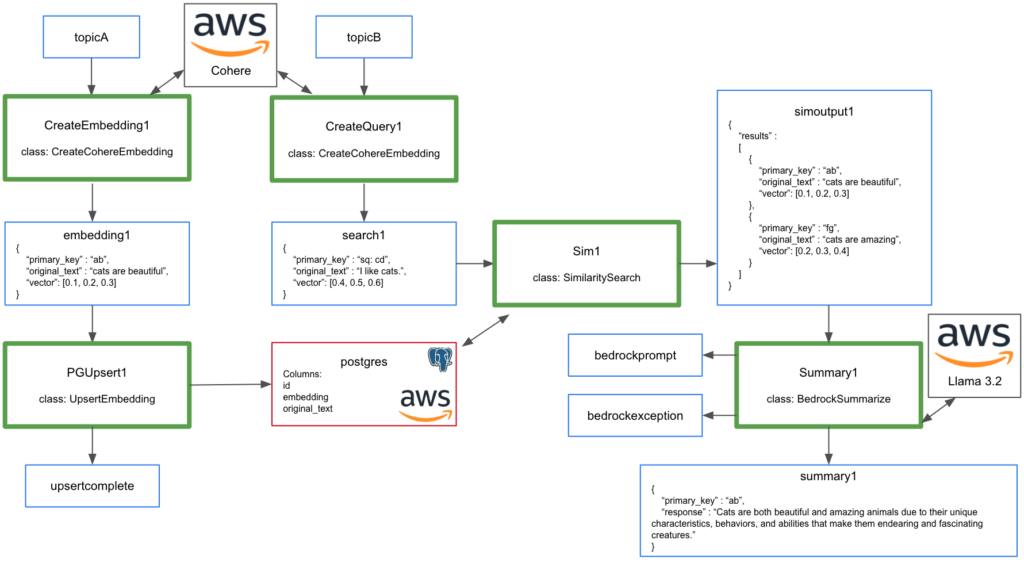
Use the scrape2.zip for these examples.
1. Create embeddings (AWS Bedrock Cohere)
After creating Bedrock client, use invoke_model with search_document input_type to create embedding.
modelId=model_id = 'cohere.embed-english-v3'
embedding_types = ["float"]
input_type = "search_document"

body = json.dumps({
  "texts": [text1],
  "input_type": input_type,
  "embedding_types": embedding_types}
)

response = self.bedrock.invoke_model(
  body=body,
  modelId=model_id,
  accept=accept,
  contentType=content_type
)
This can be deployed using pulsarctl functions create.
pulsarctl functions create --classname scrape2.CreateCohereEmbedding --py ./scrape2.zip --inputs summitstudent1/developer/topicA --output summitstudent1/developer/embedding1 --tenant summitstudent1 --namespace developer --name CreateEmbedding1 --secrets '{"BEDROCKSECRET": {"path": "bedrocksecret", "key": "mysecret"}}'
Test function by writing string message to summitstudent1/developer/topicA using DocumentProducer in TestAIExampleC. Function output will be sent to summitstudent1/developer/embedding1.
You can execute DocumentEmbeddingConsumer to view the results.
2. Sync embeddings (AWS RDS Postgres with pgvector)
Connect to AWS RDS Postgres and upsert embedding.
try:
    self.pg
except:
    DB_HOST = 'database-1.cluster-cjkgkqwq8ku7.us-east-1.rds.amazonaws.com'
    DB_PORT = 5432
    DB_NAME = 'postgres'
    DB_USER = 'postgres'
    DB_PASSWORD = context.get_secret("PGSECRET")
    self.pg = psycopg2.connect(
        host=DB_HOST,
        port=DB_PORT,
        database=DB_NAME,
        user=DB_USER,
        password=DB_PASSWORD,
        connect_timeout=10
    )

cursor = self.pg.cursor()

cursor.execute("""
    CREATE TABLE IF NOT EXISTS items5 (
    id VARCHAR(50) PRIMARY KEY,
    embedding VECTOR(1024),
    original_text VARCHAR(2000)
);
""")

self.pg.commit()

data = json.loads(record)

cursor.execute("INSERT INTO items5 (id,original_text,embedding) VALUES (%s, %s, %s)", (data["primary_key"], data["original_text"], data["vector"]))

self.pg.commit()

cursor.close()
This can be deployed using pulsarctl functions create.
pulsarctl functions create --classname scrape2.UpsertEmbedding --py ./scrape2.zip --inputs summitstudent1/developer/embedding1 --output summitstudent1/developer/upsertcomplete --tenant summitstudent1 --namespace developer --name PGUpsert1 --secrets '{"PGSECRET": {"path": "postgresspassword", "key": "mypassword"}}'
Test Postgres upsert by writing string message to summitstudent1/developer/topicA. Embedding will be sent to summitstudent1/developer/embedding1. UpsertEmbedding will read from summitstudent1/developer/embedding1 and write the primary key to topic summitstudent1/developer/upsertcomplete each time the upsert to Postgres is complete.
Write a few different messages to topicA. The embedding for each will be written to postgres. Next we will complete a similarity search.
3. Complete similarity search (AWS Bedrock Cohere)
Reuse CreateCohereEmbedding class, but have it create a search_query input_type for our similarity search.
if "input_type" in context.get_user_config_map():
  if (context.get_user_config_value("input_type") == "search_query"):
    input_type = "search_query"
    primary_key = "sq: " + primary_key
Deploy using pulsarctl functions create be adding –user-config “{\”input_type\”:\”search_query\”}”.
pulsarctl functions create --classname scrape2.CreateCohereEmbedding --py ./scrape2.zip --inputs summitstudent1/developer/topicB --output summitstudent1/developer/search1 --tenant summitstudent1 --namespace developer --name CreateQuery1 --secrets '{"BEDROCKSECRET": {"path": "bedrocksecret", "key": "mysecret"}}' --user-config "{\"input_type\":\"search_query\"}"Test function by writing string message to summitstudent1/developer/topicB using SearchProducer. Function output will be sent to summitstudent1/developer/search1. This is NOT the similarity search. This is just the vectorized version of our search text. You can check for the results in search1 by executing SearchEmbeddingConsumer.
Now that we have a search_query embedding, instead of upserting this to Postgres, we complete a similarity search to get top two results:
cursor.execute("""
  SELECT id, original_text, embedding
  FROM items5
  ORDER BY embedding <-> %s::vector
  LIMIT 2;
""", (data["vector"],))

results = cursor.fetchall()
Deploy the similarity search using pulsarctl functions create.
pulsarctl functions create --classname scrape2.SimilaritySearch --py ./scrape2.zip --inputs summitstudent1/developer/search1 --output summitstudent1/developer/simoutput1 --tenant summitstudent1 --namespace developer --name Sim1 --secrets '{"PGSECRET": {"path": "postgresspassword", "key": "mypassword"}}'
Test function by writing string message to topic summitstudent1/developer/topicB using SearchProducer again and the output will be sent to summitstudent1/developer/search1. The similarity search will read from topic summitstudent1/developer/search1 and return the most relevant results to topic summitstudent1/developer/simoutput1. You can view these results by executing SearchSimilarityConsumer.
The results will include the id, original text, and vector for the top two results of the similarity search.
4. Summarize data (AWS Bedrock Meta Llama 3.2)
Now that we have relevant documents returned by the similarity search, this data can be summarized using AWS Bedrock Meta Llama 3.2. Create query requesting data returned by similarity search be summarized into a single sentence.
myinput = json.loads(record)

bedrockquery = "summarize the following data into a single sentence:"
for index, entry in enumerate(myinput["results"], start=1):
    bedrockquery = bedrockquery + " " + str(index) + ": " + entry['original_text']

conversation = [
    {
        "role": "user",
        "content": [{"text": bedrockquery}],
    }
]

try:
    response = self.bedrock.converse(
        modelId="us.meta.llama3-2-1b-instruct-v1:0",
        messages=conversation,
        inferenceConfig={"maxTokens":512,"temperature":0.5,"topP":0.9},
        additionalModelRequestFields={}
    )

    response_text = response["output"]["message"]["content"][0]["text"]
    return f'{{"primary_key": "{str(uuid.uuid4())}", "response": "{str(response_text)}"}}'
Deploy using pulsarctl functions create.
pulsarctl functions create --classname scrape2.BedrockSummarize --py ./scrape2.zip --inputs summitstudent1/developer/simoutput1 --output summitstudent1/developer/summary1 --tenant summitstudent1 --namespace developer --name Summary1 --secrets '{"BEDROCKSECRET": {"path": "bedrocksecret", "key": "mysecret"}}'Test function by writing string message to topic summitstudent1/developer/topicB using SearchProducer and the output will be sent to summitstudent1/developer/search1. The similarity search will read from topic summitstudent1/developer/search1 and return the most relevant results to topic summitstudent1/developer/simoutput1. The summary function will read from summitstudent1/developer/simoutput1 and write the summary to topic summitstudent1/developer/summary1.
You can read the summary of results by executing SummaryConsumer.
The following results may be seen:
embeddings: cats are beautiful, cats are amazing
search: i like cats
summary: Cats are widely regarded as both beautiful and amazing animals due to their unique characteristics, playful personalities, and endearing traits.