
Example B: Stream Model Results to Topic: AWS Bedrock with Anthropic’s Claude
This examples is adapted from AWS Building with Amazon Bedrock: Text patterns labs “Lab I-3 Response streaming“.
In this example we make a request to Anthropic’s Claude to generate text for us. Instead of waiting for the entire text to be generated, we use bedrock.converse_stream to receive the data as it is generated. We periodically write the results to an output topic.
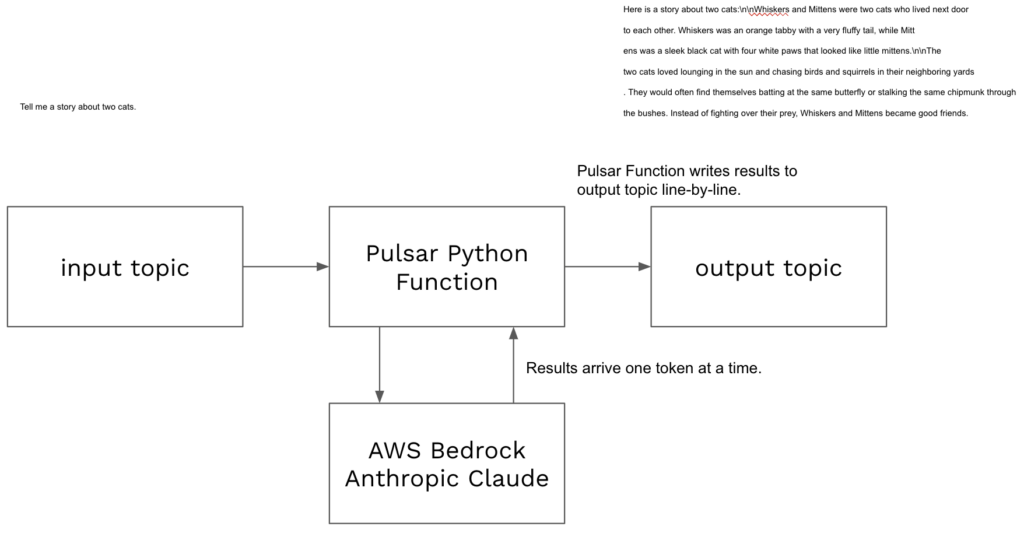
Code for this example can be found in pythonexamples class StreamMeAStory.
To deploy:
- Navigate terminal to the folder containing pythonexamples.zip.
- Execute the following pulsarctl command. Be sure to edit the tenant in four places in the command (–input, –output, –tenant, –user-config).
pulsarctl functions create --classname pythonexamples.StreamMeAStory --py ./pythonexamples.zip --inputs summitstudent1/developer/storyinput1 --output summitstudent1/developer/storyoutput1 --tenant summitstudent1 --namespace developer --name Story1 --secrets '{"BEDROCKSECRET": {"path": "bedrocksecret", "key": "mysecret"}}' --user-config "{\"output_topic_all_events\":\"summitstudent1/developer/storyoutputallevents\"}"A Bedrock client will be created using a secret stored in StreamNative Cloud.
try:
  self.bedrock
except:
  ACCESS_KEY = "AKIASUIH3KVCT35DSJWL"
  SECRET_KEY = context.get_secret("BEDROCKSECRET")
  self.bedrock = boto3.client(
    service_name='bedrock-runtime',
    aws_access_key_id=ACCESS_KEY,
    aws_secret_access_key=SECRET_KEY,
    region_name="us-east-1")
The following message will be sent to the model where record is the message text that will trigger the Pulsar Function. This is the message input into the Pulsar Function.
message = {
  "role": "user",
  "content": [ { "text": record } ]
}
Using AWS Bedrock, we make a call to Anthropic’s Claude. Using bedrock.converse_stream, we will receive the response token-by-token. This could be as small as a word or partial word. In the code example provided, we chunk 20 responses before output the result to the output topic.
response = self.bedrock.converse_stream(
  modelId="anthropic.claude-3-sonnet-20240229-v1:0",
  messages=[message],
  inferenceConfig={
    "maxTokens": 2000,
    "temperature": 0.0
  }
)
Use the StoryProducer Java code in DataStreamingSummit to send the following text to the input topic defined in your pulsarctl command (e.g. summitstudent1/developer/storytinput1).
String message = "Tell me a story about two cats.";We can use context.publish(topic, message) instead of the return statement to send messages to a topic without closing the Pulsar Function. When the messageStop response is received, we send any remaining messages and close the Pulsar Function.
context.publish(outputtopic, messageupload)Each line is a message after being batched by the Pulsar Function. Start StoryConsumer in TestAIExamples to view the model results arrive as they are published by the Pulsar Function.
Here is a story about two cats:\n\nWhiskers and Mittens were two cats who lived next door

to each other. Whiskers was an orange tabby with a very fluffy tail, while Mitt

ens was a sleek black cat with four white paws that looked like little mittens.\n\nThe

two cats loved lounging in the sun and chasing birds and squirrels in their neighboring yards

. They would often find themselves batting at the same butterfly or stalking the same chipmunk through

the bushes. Instead of fighting over their prey, Whiskers and Mittens became good friends.
We’ve now shown how Pulsar Functions can be used to stream results of models.
Use pulsarctl functions delete to delete the Pulsar Function:
pulsarctl functions delete --tenant summitstudent1 --namespace developer --name Story1You can check the configuration of your Pulsar Function using pulsar functions get:
pulsarctl functions get --tenant summitstudent1 --namespace developer --name Story1
{
  "cleanupSubscription": true,
  "retainOrdering": false,
  "retainKeyOrdering": false,
  "forwardSourceMessageProperty": true,
  "autoAck": true,
  "parallelism": 1,
  "output": "summitstudent1/developer/storyoutput1",
  "producerConfig": {
    "maxPendingMessages": 0,
    "maxPendingMessagesAcrossPartitions": 0,
    "useThreadLocalProducers": false,
    "cryptoConfig": null,
    "batchBuilder": "",
    "compressionType": ""
  },
  "processingGuarantees": "ATLEAST_ONCE",
  "runtime": "PYTHON",
  "py": "function://summitstudent1/developer/Story1",
  "tenant": "summitstudent1",
  "namespace": "developer",
  "name": "Story1",
  "className": "pythonexamples.StreamMeAStory",
  "resources": {
    "cpu": 0.5,
    "disk": 10737418240,
    "ram": 2147483648
  },
  "inputs": [
    "summitstudent1/developer/storyinput1"
  ],
  "userConfig": {
    "output_topic_all_events": "summitstudent1/developer/storyoutputallevents"
  },
  "inputSpecs": {
    "summitstudent1/developer/storyinput1": {}
  },
  "customRuntimeOptions": "{\"clusterName\":\"train\",\"inputTypeClassName\":\"[B\",\"outputTypeClassName\":\"[B\",\"maxReplicas\":0,\"managed\":true,\"serviceAccountName\":\"train-function-pulsarcluster\",\"runnerImage\":\"streamnative/pulsar-functions-pulsarctl-python-runner:3.3.1.8\",\"enableStateStore\":false,\"labels\":{\"cloud.streamnative.io/location\":\"us-central1\",\"cloud.streamnative.io/poolmember-name\":\"gcp-shared-usce1-snc\",\"cloud.streamnative.io/poolmember-namespace\":\"streamnative\",\"cloud.streamnative.io/pulsar-cluster\":\"train\",\"cloud.streamnative.io/pulsar-instance\":\"train\",\"cloud.streamnative.io/role\":\"pulsar-function\",\"istio.io/rev\":\"sn-stable\",\"service.istio.io/canonical-name\":\"pulsarcluster-train\",\"service.istio.io/canonical-revision\":\"3.2.1.1\"},\"annotations\":{\"cloud.streamnative.io/service-account.email\":\"summitstudent1@o-mj3r8.auth.streamnative.cloud\",\"compute.functionmesh.io/need-cleanup\":\"false\"}}",
  "secrets": {
    "BEDROCKSECRET": {
      "key": "mysecret",
      "path": "bedrocksecret"
    }
  },
  "maxPendingAsyncRequests": 1000,
  "exposePulsarAdminClientEnabled": false,
  "skipToLatest": false,
  "subscriptionPosition": "Latest"
}
You can check the status of your Pulsar Function using pulsar functions status. pulsar functions stats may also provide additional information for troubleshooting.
pulsarctl functions status --tenant summitstudent1 --namespace developer --name Story1
{
  "numInstances": 1,
  "numRunning": 1,
  "instances": [
    {
      "instanceId": 0,
      "status": {
        "running": true,
        "error": "",
        "numRestarts": 0,
        "numReceived": 2,
        "numSuccessfullyProcessed": 2,
        "numUserExceptions": 0,
        "latestUserExceptions": [],
        "numSystemExceptions": 0,
        "latestSystemExceptions": [],
        "averageLatency": 14793.160796165466,
        "lastInvocationTime": 1729532641155,
        "workerId": "train"
      }
    }
  ]
}