
Example A: Convert Unstructured Text to JSON with Sentiment Analysis: AWS Bedrock with Anthropic’s Claude
This example is adapted from AWS Building with Amazon Bedrock: Text patterns labs “Lab I-6 Extracting JSON data from text“.
In this example we convert unstructured text data of an email into a structured json containing the following fields:
- summary
- escalate_complaint
- level_of_concern
- overall_sentiment
- supporting_business_unit
- customer_names
- sentiment_towards_employees
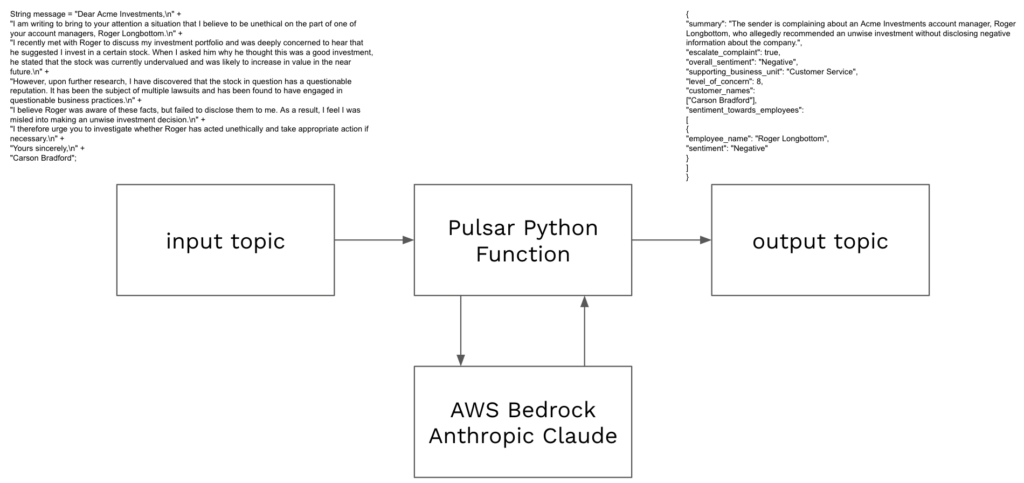
Code for this example can be found in pythonexamples class SentimentAnalysis.
To deploy:
- Navigate terminal to the folder containing pythonexamples.zip.
- Execute the following pulsarctl command. Be sure to edit the tenant in three places in the command (–input, –output, –tenant).
pulsarctl functions create --classname pythonexamples.SentimentAnalysis --py ./pythonexamples.zip --inputs summitstudent1/developer/sentimentinput1 --output summitstudent1/developer/sentimentoutput1 --tenant summitstudent1 --namespace developer --name Sentiment1 --secrets '{"BEDROCKSECRET": {"path": "bedrocksecret", "key": "mysecret"}}'If the Pulsar Function deploys, you should see:
Created Sentiment1 successfullyA Bedrock client will be created using a secret already stored in StreamNative Cloud.
try:
  self.bedrock
except:
  ACCESS_KEY = "AKIASUIH3KVCT35DSJWL"
  SECRET_KEY = context.get_secret("BEDROCKSECRET")
  self.bedrock = boto3.client(
    service_name='bedrock-runtime',
    aws_access_key_id=ACCESS_KEY,
    aws_secret_access_key=SECRET_KEY,
    region_name="us-east-1")
The following message will be sent to the model where record is the message text that will trigger the Pulsar Function. This is an input into the Pulsar Function.
message = {
    "role": "user",
    "content": [
        { "text": f"<content>{record}</content>" },
        { "text": "Please use the summarize_email tool to generate the email summary JSON based on the content within the <content> tags." }
    ],
}
Using AWS Bedrock, we make a call to Anthropic’s Claude, specifying the summarize_email tool and the tools list. The response will be formatted and returned by the Pulsar Function to the output topic specified in the pulsarctl command used to deploy the function.
response = self.bedrock.converse(
    modelId="anthropic.claude-3-sonnet-20240229-v1:0",
    messages=[message],
    inferenceConfig={
        "maxTokens": 2000,
        "temperature": 0
    },
    toolConfig={
        "tools": tool_list,
        "toolChoice": {
            "tool": {
                "name": "summarize_email"
            }
        }
    }
)
Use the SentimentProducer Java code in TestAIExamples to send the following text to the input topic defined in your pulsarctl command (e.g. summitstudent1/developer/sentimentinput1).
String message = "Dear Acme Investments,\n" +
"I am writing to bring to your attention a situation that I believe to be unethical on the part of one of your account managers, Roger Longbottom.\n" +
"I recently met with Roger to discuss my investment portfolio and was deeply concerned to hear that he suggested I invest in a certain stock. When I asked him why he thought this was a good investment, he stated that the stock was currently undervalued and was likely to increase in value in the near future.\n" +
"However, upon further research, I have discovered that the stock in question has a questionable reputation. It has been the subject of multiple lawsuits and has been found to have engaged in questionable business practices.\n" +
"I believe Roger was aware of these facts, but failed to disclose them to me. As a result, I feel I was misled into making an unwise investment decision.\n" +
"I therefore urge you to investigate whether Roger has acted unethically and take appropriate action if necessary.\n" +
"Yours sincerely,\n" +
"Carson Bradford";
After the response is formatted, the following should be written to the output topic. You can check for the output by executing SentimentConsumer.
{
  "summary": "The sender is complaining about an Acme Investments account manager, Roger Longbottom, who allegedly recommended an unwise investment without disclosing negative information about the company.",
  "escalate_complaint": true,
  "overall_sentiment": "Negative",
  "supporting_business_unit": "Customer Service",
  "level_of_concern": 8,
  "customer_names":
   ["Carson Bradford"],
  "sentiment_towards_employees":
   [
    {
      "employee_name": "Roger Longbottom",
      "sentiment": "Negative"
    }
  ]
}
We’ve now converted unstructured text into structured text in a JSON using Anthropic’s Claude in AWS Bedrock. The message can be easily routed for further processing using the various fields. If you don’t see the output, you can check the status of your Pulsar function using pulsarctl functions status:
pulsarctl functions status --tenant summitstudent1 --namespace developer --name Story1
{
  "numInstances": 1,
  "numRunning": 1,
  "instances": [
    {
      "instanceId": 0,
      "status": {
        "running": true,
        "error": "",
        "numRestarts": 0,
        "numReceived": 2,
        "numSuccessfullyProcessed": 2,
        "numUserExceptions": 0,
        "latestUserExceptions": [],
        "numSystemExceptions": 0,
        "latestSystemExceptions": [],
        "averageLatency": 14793.160796165466,
        "lastInvocationTime": 1729532641155,
        "workerId": "train"
      }
    }
  ]
}
Use pulsarctl functions delete to delete the Pulsar Function:
pulsarctl functions delete --tenant summitstudent1 --namespace developer --name Sentiment1You can check the configuration of your Pulsar Function using pulsar functions get:
pulsarctl functions get --tenant summitstudent1 --namespace developer --name Story1
{
  "cleanupSubscription": true,
  "retainOrdering": false,
  "retainKeyOrdering": false,
  "forwardSourceMessageProperty": true,
  "autoAck": true,
  "parallelism": 1,
  "output": "summitstudent1/developer/storyoutput1",
  "producerConfig": {
    "maxPendingMessages": 0,
    "maxPendingMessagesAcrossPartitions": 0,
    "useThreadLocalProducers": false,
    "cryptoConfig": null,
    "batchBuilder": "",
    "compressionType": ""
  },
  "processingGuarantees": "ATLEAST_ONCE",
  "runtime": "PYTHON",
  "py": "function://summitstudent1/developer/Story1",
  "tenant": "summitstudent1",
  "namespace": "developer",
  "name": "Story1",
  "className": "pythonexamples.StreamMeAStory",
  "resources": {
    "cpu": 0.5,
    "disk": 10737418240,
    "ram": 2147483648
  },
  "inputs": [
    "summitstudent1/developer/storyinput1"
  ],
  "userConfig": {
    "output_topic_all_events": "summitstudent1/developer/storyoutputallevents"
  },
  "inputSpecs": {
    "summitstudent1/developer/storyinput1": {}
  },
  "customRuntimeOptions": "{\"clusterName\":\"train\",\"inputTypeClassName\":\"[B\",\"outputTypeClassName\":\"[B\",\"maxReplicas\":0,\"managed\":true,\"serviceAccountName\":\"train-function-pulsarcluster\",\"runnerImage\":\"streamnative/pulsar-functions-pulsarctl-python-runner:3.3.1.8\",\"enableStateStore\":false,\"labels\":{\"cloud.streamnative.io/location\":\"us-central1\",\"cloud.streamnative.io/poolmember-name\":\"gcp-shared-usce1-snc\",\"cloud.streamnative.io/poolmember-namespace\":\"streamnative\",\"cloud.streamnative.io/pulsar-cluster\":\"train\",\"cloud.streamnative.io/pulsar-instance\":\"train\",\"cloud.streamnative.io/role\":\"pulsar-function\",\"istio.io/rev\":\"sn-stable\",\"service.istio.io/canonical-name\":\"pulsarcluster-train\",\"service.istio.io/canonical-revision\":\"3.2.1.1\"},\"annotations\":{\"cloud.streamnative.io/service-account.email\":\"summitstudent1@o-mj3r8.auth.streamnative.cloud\",\"compute.functionmesh.io/need-cleanup\":\"false\"}}",
  "secrets": {
    "BEDROCKSECRET": {
      "key": "mysecret",
      "path": "bedrocksecret"
    }
  },
  "maxPendingAsyncRequests": 1000,
  "exposePulsarAdminClientEnabled": false,
  "skipToLatest": false,
  "subscriptionPosition": "Latest"
}