Tutorial: Adding the Order Java Class
Follow along with the Tutorial Videos. They are part of your Hands-on Exercise.
Instead of passing around a String message, we have decided our application will scale better if we use an Order object from a new Order Java class. In the following three videos and as part of your Hands-on Exercise, you will complete the following:
1. Add the Order Java class to our application.
2. Change the schema of all four existing topics from String to Order.
3. Create new subscriptions for InventoryCheckerUS, InventoryCheckerChina, and ConfirmationEmail to easily abandon existing String messages in these topics. In a real cluster this isn’t practical, abandoned subscriptions will accumulate backlog indefinitely and consume large amounts of disk space. This will be discussed later more in depth.
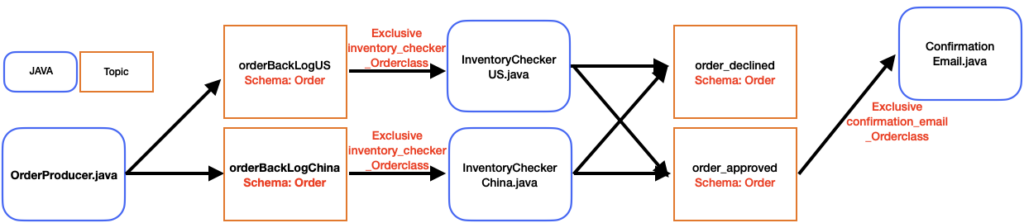
Instead of passing around a String, we will want to change our schema to use the Order Java class.
This requires multiple changes in our application:
- In OrderProducer.java, the message we pass into producer.newMessage().value(message) should be an Order object. Make the following changes to OrderProducer.java:
Order message = messageGenerator.nextOrder();

String topic = null;
if (message.getCountry().contains("China")) {
     topic = "persistent://student31/developer/orderBackLogChina";
} else {
     topic = "persistent://student31/developer/orderBackLogUS";
}

System.out.println("Will publish order " + message.getUniqueOrderNumber() + " asynchronously to topic " + topic);

return producerFactory.getProducer(topic).thenCompose((producer) -> {
     return producer.newMessage().value(message).sendAsync();
});- In ProducerFactory.java, we must make sure our Producer has a schema of Schema.JSON(Order.class). Make the following changes to ProducerFactory.java:
public final Map<String, CompletableFuture<Producer<Order>>> producerCache;

public CompletableFuture<Producer<Order>> getProducer(String topicName) {
    return producerCache.computeIfAbsent(topicName, (tn) -> {
        System.out.println("Creating new producer with topic " + tn);
        return client.newProducer(Schema.JSON(Order.class)).topic(tn).createAsync();
    });
}

public void close() throws IOException {
    for (CompletableFuture<Producer<Order>> producerFuture : producerCache.values()) {
        try {
            producerFuture.get().close();
        } catch (PulsarClientException | InterruptedException | ExecutionException e) {
            throw new IOException(e);
        }
    }
}
Even with these changes, we are unable to write messages to the topic. This is because the String schema is registered to the topic. We will fix this in the following video.
You may also not be able to compile the code until InventoryCheckerChina, InventoryCheckerUS and Confirmation have been updated to use the new Order class. The following are examples of the changes that will be needed in those files to work with the new Order class:
CompletableFuture<Consumer<Order>> consumer;

if(msg.getValue().getQuantity() > 7) {
    topic = "persistent://student31/developer/order_declined";
} else {
    topic = "persistent://student31/developer/order_approved";
}

CompletableFuture<Message<Order>> handleMessage(CompletableFuture<Message<Order>> message)

consumer = client.newConsumer(Schema.JSON(Order.class))
    .topic(topicName)
    .subscriptionName(subscriptionName)
    .subscriptionType(SubscriptionType.Exclusive)
    .subscriptionInitialPosition(SubscriptionInitialPosition.Earliest)
    .subscribeAsync();

CompletableFuture<MessageId> myFuture = producerFactory.getProducer(topic).thenCompose((producer) -> {
    return producer.newMessage().value(msg.getValue()).sendAsync();
});