Hands-on Exercise: Consuming Messages Asynchronously
Complete the following for your Hands-on Exercise:
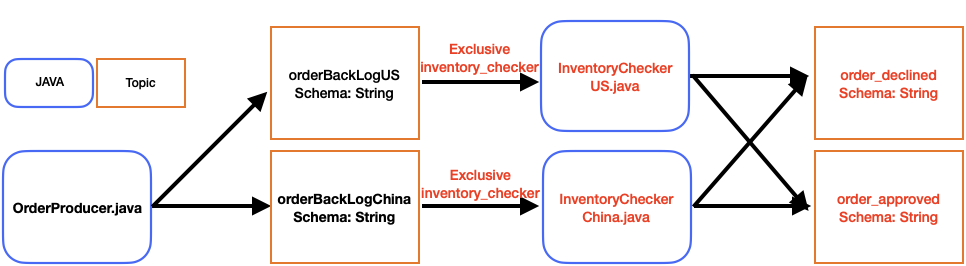
- Follow the tutorial for consuming messages from InventoryBacklogChina and writing messages to either topic order_approved or order_declined depending on if the string contains a value of 2.
- Create a similar consumer called InventoryCheckerUS that reads from inventoryBackLogUS, and writes to order_approved and order_declined. Be sure to update all of the following items:
- Use the new class name InventoryCheckerUS.
- Update the main method to create an instance of this class:
public static void main(String[] args) throws ExecutionException, InterruptedException {
  InventoryCheckerUS inventoryChecker = new InventoryCheckerUS();
  ShutdownHook.registerForShutdownHook(inventoryChecker);
  inventoryChecker.run().get();
}- Update the topicName.
- You can use the same subscriptionName since you’re reading messages from a different topic.
- The following command can be used to execute your code if you used the above naming conventions (see pom.xml for why this works):
mvn compile exec:java@inventory_checker_us
The terminal output for InventoryCheckerUS.java should look as follows:
Starting sn_training.dev_training.InventoryCheckerUS
Handling message: 1US
Creating new producer with topic persistent://student31/developer/order_approved
Published and will acknowledge message 1US to topic persistent://student31/developer/order_approved
Handling message: 3US
Published and will acknowledge message 3US to topic persistent://student31/developer/order_approved
Handling message: 5US
Published and will acknowledge message 5US to topic persistent://student31/developer/order_approved
Handling message: 7US
Published and will acknowledge message 7US to topic persistent://student31/developer/order_approved
Handling message: 9US
Published and will acknowledge message 9US to topic persistent://student31/developer/order_approved
Handling message: 11US
Published and will acknowledge message 11US to topic persistent://student31/developer/order_approved
Handling message: 13US
Published and will acknowledge message 13US to topic persistent://student31/developer/order_approved
Handling message: 15US
Published and will acknowledge message 15US to topic persistent://student31/developer/order_approved
Handling message: 17US
Published and will acknowledge message 17US to topic persistent://student31/developer/order_approved
Handling message: 19US
Published and will acknowledge message 19US to topic persistent://student31/developer/order_approved
Handling message: 21US
Creating new producer with topic persistent://student31/developer/order_declined
Published and will acknowledge message 21US to topic persistent://student31/developer/order_declined
Handling message: 23US
Published and will acknowledge message 23US to topic persistent://student31/developer/order_declined
The application should now look like the following: