
Tutorial: Consuming Messages Asynchronously
Follow along with the Tutorial Video. It is part of your Hands-on Exercise.
We are producing messages asynchronously to orderBackLogChina and orderBackLogUS in our e-commerce application, simulating orders arriving in different regions. Let’s learn how to consume messages asynchronously from one of these topics and simulate a Java application that would check if there is available inventory to approve the order.
We will complete the following:
1. Create InventoryCheckerChina.java to read String messages asynchronously from orderBackLogChina.
2. Acknowledge the message asynchronously.
3. Approved orders will be sent to topic order_approved for further processing. Declined orders will be sent to topic order_declined.
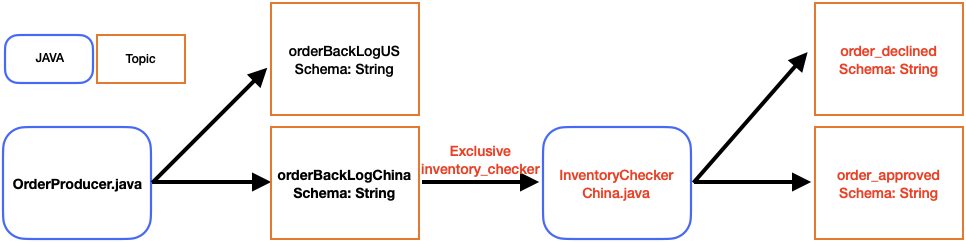
You can find InventoryCheckerChina.java in the AdditionalFiles folder.
InventoryCheckerChina.java extends AsyncRunner. We are responsible for implementing setup(PulsarClient client) and workLoop().
Declare the CompletableFuture and subscriptionName in the InventoryCheckerChina class.
CompletableFuture<Consumer<String>> consumer;
final String subscriptionName = "inventory_checker";
In setup(PulsarClient client), we create and register our consumer using the following:
consumer = client.newConsumer(Schema.STRING)
.topic(topicName)
.subscriptionName(subscriptionName)
.subscriptionType(SubscriptionType.Exclusive)
.subscriptionInitialPosition(SubscriptionInitialPosition.Earliest)
.subscribeAsync();

return consumer.thenAccept(this::registerResource);
In workloop(), we use receiveAsync() to get the next message. We pass this CompletableFuture to handleMessage(). handleMessage() returns a CompletableFuture that we use to acknowledgeAsync().
return consumer.thenCompose((consumer) -> {
     return handleMessage(consumer.receiveAsync()).thenCompose((msg) -> consumer.acknowledgeAsync(msg));
});