
Deploy Kafka Connect Snowflake Sink Connector
This guide assumes you have already deployed a StreamNative Cluster using either the Classic Engine (available with Serverless, Dedicated, or BYOC deployment options) or Ursa Engine (available with the BYOC deployment option). To get started quickly using a $200 Free Credit, follow Cluster Setup for Getting Started with Kafka on StreamNative to deploy a Serverless Cluster using the Classic Engine.
In this example we:
- Deploy a Kafka Connect Snowflake Sink Connector
- Produce Kafka Messages with AVRO schema using a Java Client
- Query results in Snowflake
The following fields are configured using StreamNative UI:
- Sink Name
- Service Account (provided produce, consume, and sinks permissions on public/default, and Service Account Binding)
- snowflake.url.name
- snowflake.user.name
- Authentication Secrets
- snowflake.database.name
- snowflake.schema.name
- Topics
- snowflake.role.name
- snowflake.ingestion.method (SNOWPIPE or SNOWPIPE_STREAMING)
- Key converter class
- Value converter class (supported converters with SNOWPIPE_STREAMING)
- Value converter configurations
- value.converter.schema.registry.url (schema registry url from StreamNative UI)
- value.converter.basic.auth.credentials.source (USER_INFO)
- value.converter.basic.auth.user.info (public:<api key>)
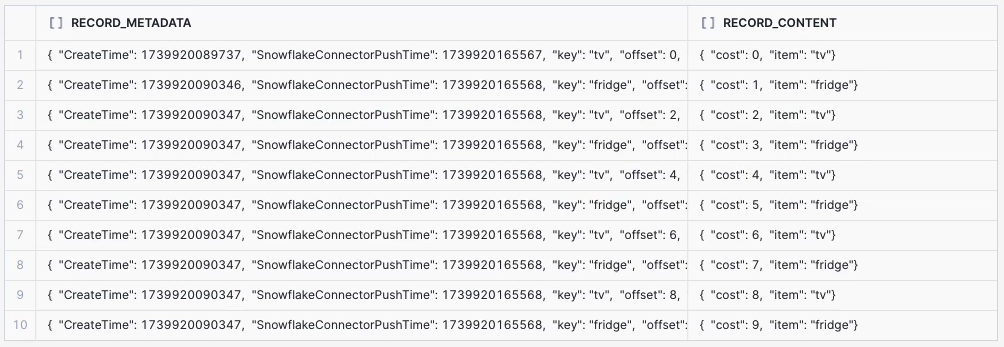
For this test, Kafka messages are published to topic kafka10 with AVRO Schema with fields item and cost. The resulting table will have two columns of RECORD_METADATA and RECORD_CONTENT as described here. The link includes more information for querying data in this format.
Documentation for Kafka Connect Snowflake Sink Connector